Introduction
Welcome to my STEM‑Focused Electronics & Soldering Learning Website, created to support educational institutions and professional educators. This platform is dedicated to advancing STEM education through electronics and safe soldering practices, with resources designed specifically for classroom and institutional use.
My recommendations are intended for schools, universities, and other formal learning environments where soldering activities are part of structured STEM programs. By following these guidelines, educators can ensure safe practices for both themselves and their students, fostering a secure and productive learning environment.
As the designer of this website and the accompanying soldering kit, my primary goal is to empower educators to integrate hands‑on electronics into their teaching while maintaining the highest standards of safety. I recognize the risks involved in soldering, especially when working with electrically powered devices, and I am committed to raising awareness of these hazards. My resources are built to help institutions provide safe, effective, and engaging STEM learning experiences.
Safety Is My Top Priority
When it comes to soldering safety, my foremost concern is protecting students, educators, and institutions from risks such as electrocution, burns, eye injuries, poisoning, or electrical fires that could cause harm or damage property.
In developing the LED American Flag Soldering Kit, I carefully considered potential hazards — including electrical risks, soldering errors, and common assembly mistakes — with the goal of creating a safe, structured learning experience for classrooms and labs.
The PRO-KIT-01 soldering kit and the accompanying safety course were designed specifically for educational institutions, drawing on my technical education, career experience, and established industry safety practices. While no activity can eliminate all hazards, these resources are crafted to minimize risks and ensure that educators can confidently introduce soldering into STEM programs.
Because the kit PRO-KIT-01 is powered by a 24‑Volt AC/DC converter connected to a 120‑Volt outlet, it is intended for institutional use under professional supervision. It is not recommended for unsupervised individuals or casual hobbyists.
Understanding the Key Differences:
Educational Institutions vs. Electronics Industry Professionals
In professional electronics environments, soldering technicians are responsible only for assembly and soldering. Electrical power is not applied during this stage. Instead, quality assurance personnel will often inspect the work, and only trained engineers or technicians are authorized to apply power and perform electrical testing.
In educational settings, educators and students may take on multiple roles — soldering, inspection, troubleshooting, and sometimes testing. Because these responsibilities are combined, it is essential that clear safety guidelines and supervision are in place to support safe learning and practice.
The Importance of Knowledge and Caution
Even with the best safety practices in place, safety ultimately depends on the awareness, knowledge, and care of each participant during every stage of the soldering process. In an educational environment, educators and students may take on multiple roles — assembly, soldering, inspection, and troubleshooting — each carrying its own set of risks. Every step should be approached with caution, attention to detail, and adherence to established safety guidelines to ensure a secure and effective learning experience.
Do Not Work with Individuals Who Do Not Follow Safety Practices
Working with others who ignore safety protocols increases your risk. Always collaborate with individuals who are committed to safety and adhere to the proper procedures.
Preventing Accidents: A Focus on Safety
By following established safety guidelines and maintaining a vigilant attitude, educators and students can greatly reduce the risks associated with soldering. In professional environments, soldering accidents are rare because strict protocols separate responsibilities — assembly and soldering are performed by technicians, while electrical testing is reserved for trained engineers.
In educational settings, however, participants may take on multiple roles, including soldering, inspection, and troubleshooting. With proper knowledge, care, and attention to detail, these activities can be carried out safely in the classroom. By adhering to clear safety practices and supervision, institutions can provide a secure and effective learning experience.
Soldering Safety: Age-Related Recommendations
Soldering involves various risks that require careful attention. Here are key safety tips:
Age and Supervision
Always ensure that individuals under 18 are supervised by a qualified adult when working with electrical equipment. When selecting soldering kits, choose ones that are age-appropriate for the skill level of the user. Kits designed for beginners or younger users should have simple instructions, low-voltage power sources, and safe components to minimize risks.
Avoid High-Voltage Devices
Do not work with high-voltage devices (such as those plugged directly into 120V or 240V outlets) unless you have professional experience with electronics and electrical systems. If you do not have professional training and experience, avoid working on any device or wiring above 24 volts.
Use Low-Voltage Kits
Use low-voltage soldering kits powered by batteries or AC/AC and AC/DC adapters with a maximum output of 24 volts. Ensure that any AC/AC or AC/DC adapters are equipped with overload and short-circuit protection and always buy from reputable manufacturers. When selecting a soldering kit, make sure it is suitable for your skill level and age to ensure safe and effective use.
Recommended Age & Knowledge Requirements
for Soldering & Electrical Work
To ensure safety during electrical work, it is essential to incorporate safety limits:
1. Age Limitations for Electrical Work
-
Under 12 Years Old: Individuals under the age of 12 should not engage in soldering or work with electrical devices, even under supervision.
-
Reason: Children at this age may lack the necessary fine motor skills, awareness of safety hazards, or understanding of the potential risks associated with electrical work and soldering tools. The safety risks are significant, and supervision may not be sufficient for their developmental stage.
-
-
Ages 12-15 (Middle School Age): Teenagers in this age group can work with soldering kits and electrical devices, but only with direct supervision by a qualified adult or instructor. The voltage should be low (preferably below 12V) to reduce electrical shock hazards.
-
Reason: While some young teens may have the capability to follow instructions and handle soldering tools, they are still developing both physically and cognitively. Supervision is necessary, and only low-voltage equipment should be used to mitigate the risks.
-
-
Ages 16-17 (High School Age): Teens in this age group may work with soldering kits and electrical devices under supervision but limited to use only low-voltage power sources no greater than 24V.
-
Reason: By this age, individuals generally have better cognitive and motor skills to understand safety practices and execute tasks carefully. However, hands-on experience and guidance are essential to avoid mistakes. For their safety, the equipment should remain low voltage.
-
-
18 Years and Older: Individuals 18 and older can work on electrical devices and soldering kits with minimal supervision, assuming they have the appropriate knowledge and training.
-
Reason: Adults have the legal capacity and generally the experience to handle electrical devices independently. However, for higher-voltage equipment or more complex tasks, additional training or certification is recommended to ensure safety.
-
2. Voltage Restrictions for Electrical Work
-
Regardless of age, no one should handle electrical devices or power sources exceeding 24 volts unless they are qualified, trained professionals.
-
Reason: Working with voltages above 24V significantly increases the risk of electrical shock and other hazards. Always ensure that voltage levels are kept below 24V for safer handling.
-
Safety Considerations
-
While these guidelines help minimize risks, each workspace and situation can be unique. It is essential to identify potential hazards before beginning any soldering work. Never underestimate the importance of safety—your well-being should always be the priority.
My Soldering Safety Recommendations
Prior to starting any work, always put on your safety glasses.
Wear eye protection because molten solder and chemicals can splash on the eyes.
Safety glasses also protect your eyes from projectiles like flying clipped component leads.


Power Isolation Safety Precautions
Before beginning any procedures, ensure that all power sources are completely disconnected from your work. This includes removing connections to both internal and external power sources, such as mains electricity, like your wall outlet, batteries, and large capacitors. If batteries are directly mounted on the circuit board, they must be removed. Any external batteries should also be disconnected. Additionally, ensure that large capacitors are safely discharged to ground to prevent electrical hazards.
When setting up soldering station, it is crucial to choose a proper work area and workbench to set up your soldering equipment and perform assembly, soldering, and testing tasks safely.
A clean, stable, and dedicated workspace is essential to ensuring both safety and efficiency.
Ideally, your workbench should be placed against a wall, with a nearby wall outlet to power your soldering equipment. Avoid using extension cords to power your soldering tools, as they can pose safety risks.
Ensure your workspace is located in a dry area, free from any moisture, and is well-ventilated with proper lighting.
Avoid placing your workbench near exposed electrical conduits, water pipes, or any conductive materials that could create a low-resistance path to earth ground. Regardless of the material used for the frame, make sure your workbench is isolated from earth ground to prevent accidental electrical shocks.

When setting up your soldering station, it’s essential to use only 3-pronged electrical outlets that are properly grounded. A 3-pronged outlet is designed with three prongs: one for the hot wire, one for the neutral wire, and a third for the ground wire. The ground wire is a critical safety feature that directs any stray electrical current safely to the ground, reducing the risk of electrical shock.

However, simply having a 120-volt outlet with a ground prong does not guarantee that the ground wire is properly connected or functional. The ground wire may be missing, disconnected, or improperly installed, which could result in an unsafe setup. Even if the outlet appears functional, it is important to verify that the ground connection is intact and operational.
To ensure safety, have an electrician verify the grounding of the outlet before using it for any electrical equipment. A non-functional ground can leave you vulnerable to electrical hazards, especially when working with equipment like soldering irons that are plugged into the wall. Always confirm that the grounding system is working as intended to protect both you and your workspace from potential electrical accidents.
While outlets with a ground terminal offer protection in many situations, an even safer choice for electrical safety is to install a Ground Fault Outlet (GFI). These GFIs provide far superior protection compared to standard 3-pronged outlets. In a worst-case scenario, a GFI can be a lifesaver.

Work in a well‐ventilated area, to prevent the mildly caustic and toxic fumes from the flux building up and causing eye or throat irritation.

Adjustable office chairs are the standard in the electronics industry. For optimal ergonomics, use an adjustable office chair whenever possible for your electronics work.
Avoid ever using a metal chair or stool as they can be an electrical safety hazard.


Plug-In Soldering Iron
Direct Wall Outlet Connection
(No Grounding or Electrical Isolation, Shock & Fire Hazard)

No Grounding:
-
Basic soldering irons that plug directly into a 120V or 220V wall outlet often lack a ground prong. Without grounding, there is a risk that the user could receive an electrical shock if there's an issue with the iron's wiring or if the device becomes faulty.
-
Since there's no direct path for stray current to safely flow to the ground, it can accumulate in the device, and in the event of a malfunction or a short circuit, the user may be exposed to electrical hazards.
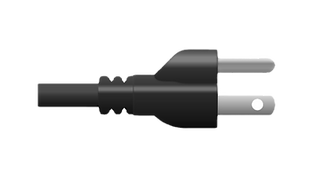
Do Not Use: Two‑Prong Soldering Irons Avoid soldering irons that plug directly into a wall outlet with only two prongs. These irons lack grounding and electrical isolation, creating a serious risk of electric shock and fire hazards.

In the electronics industry, soldering stations with isolation transformers and grounded plugs are the standard equipment, as opposed to basic soldering irons that plug directly into wall outlets. Soldering stations offer significantly better electrical isolation and protection, minimizing the risk of electrical shock or damage—features that traditional soldering irons lack.
Additionally, the electrical cords of soldering stations are often made from heat-resistant materials designed to withstand burns or melting, even if the soldering iron tip accidentally touches them. In contrast, the cords of basic soldering irons are typically not heat-resistant and can quickly melt down to the electrical conductor if contacted by the hot tip.
Recommended Soldering Equipment:
Station Type
Safety with Grounding:
-
Soldering stations typically have a grounded plug (three-prong plug with a ground wire) which ensures that the soldering iron is safely grounded. This significantly reduces the risk of electrical shock to the user, in the event of faulty equipment.
-
The ground connection also helps in preventing damage to sensitive electronic components by minimizing electrostatic discharge (ESD). ESD can be harmful to sensitive electronic parts, and grounding helps protect them from accidental static buildup.
Isolation Transformer:
-
Many soldering stations are equipped with an isolation transformer, which separates the user and the equipment from the power supply, offering another layer of safety. This transformer provides electrical isolation between the device and the main power grid, reducing the risk of direct electrical contact with high-voltage components.
-
An isolation transformer is particularly important for sensitive projects, like working with microelectronics or other low-voltage components.
Enhanced Safety for Extended Use:
-
If you're doing extended soldering sessions, the isolation and grounding features in a soldering station provide safer operation over time. The iron's heating element is less likely to cause accidental shock or malfunction, which is crucial for professionals or anyone doing complex work regularly.
Advantages:
-
Improved safety: The ground and isolation transformer reduce the risk of electrical shock and protect the user from electrical hazards.
-
Prevents damage: Grounding reduces the risk of electrostatic discharge (ESD) damaging sensitive components.
-
Stable, safe operation: The isolated transformer offers protection from power surges, ensuring stable and consistent performance.
Soldering Materials Safety Recommendations
As someone studying soldering, it’s important to "Keep It Simple."
Avoid using liquid or paste soldering fluxes.
Use wire-type no-clean or rosin-core solder instead of liquid or paste-based fluxes. Liquid and paste fluxes can introduce additional chemical hazards and complicate the disposal of hazardous waste.
Liquid and paste fluxes are typically not used in electronics industry for hand soldering, except in specific situations such as tinning components and wires, or when addressing solderability issues that require a more aggressive flux.
Avoid Both Hazardous Chemicals and Hazardous Waste in Your Soldering Projects by Choosing Not to Clean Your Circuit Boards After Soldering
To minimize hazardous waste, consider using solder with no-clean flux, which completely eliminates the need for cleaning with isopropyl alcohol. If you do choose to use rosin-based flux, it’s important to know that while electronics manufacturers typically clean off rosin-based flux to prevent long-term corrosion and potential circuit failure, it is not always necessary to clean it off your circuit boards after soldering.
In most cases, rosin-based flux becomes inert after the soldering process and can safely remain on the board. However, if the circuit is intended for critical applications, where reliability is paramount, thorough cleaning may be required to avoid any potential issues.
To eliminate the risk of lead poisoning consider using lead-free solder. This type of solder still contains metals, in the form of tin, copper, silver, and sometimes bismuth, indium, zinc, antimony, and other metals in varying amounts.

Safety Data Sheets (SDS)
Safety Data Sheets (SDS) are important for ensuring safety while working with soldering materials, such as solder, flux, and cleaning chemicals. While these materials may seem harmless, they can present health risks if not handled properly.
Here’s what you should know:
1. Know What You're Using:
Many solders contain metals like lead or other potentially harmful substances. Fluxes, especially rosin-based flux, can release fumes that may irritate the eyes, lungs, or skin. SDS provides crucial information about the ingredients in the materials you're working with and the associated hazards.
2. Health Risks:
SDSs outline potential health risks, including exposure to toxic substances like lead or flux fumes. If you’re working with materials that contain these substances, knowing the symptoms of exposure, such as respiratory issues or skin irritation, can help you take proper precautions.
3. Handling and Storage:
The SDS will also provide instructions on how to safely handle and store soldering materials. For example, it may specify that solder should be kept in a cool, dry place, and that flux should be handled with care to avoid skin contact.
4. Emergency Measures:
In case of accidental exposure (like inhaling fumes or getting flux on your skin), the SDS will tell you what to do, including first-aid measures and when to seek medical help.
5. Disposal Guidelines:
After finishing your soldering project, it's important to dispose of leftover materials like soldering wire and flux correctly. The SDS will guide you on safe disposal methods to avoid environmental contamination or health risks.
6. Where to Find SDS:
You can usually find the SDS for your soldering materials from the manufacturer’s website. Many brands provide them as downloadable PDFs for free. If you're buying solder or flux from a local supplier, you can also request the SDS directly from them. Additionally, online safety databases and chemical supply websites may have SDS for commonly used materials. It’s important to keep a copy of the SDS for each product you're using in your workspace for easy access.
By taking the time to review the SDS for the materials you're using, you can protect yourself, your home environment, and your electronics. While it might seem like a lot of information, SDSs are a valuable tool for creating a safer soldering workspace. Always keep them on hand when working with potentially hazardous substances.

Give any soldered surface a minute or two to cool down before you touch it.

Never touch the element or tip of the soldering iron.
They are very hot and will give you a bad burn.

Do not hold components by their leads that you intend to heat with your fingers, use tweezers, needle nose pliers, or other means of securing the work.

When clipping leads of electronic components use your finger, tweezers, or needle nose pliers to hold the lead secure so it will not fly off, and hit you, or someone else in the face or eye.

Turn the soldering iron off or unplug it when not in use.


1. Breaks and Stretching: Regularly take breaks during work or activities that strain your hands, wrists, and upper body. Use these breaks to stretch and relieve tension.
2. Posture Matters: Maintain proper posture while sitting. Keep your spine aligned, shoulders relaxed, and feet flat on the floor. Avoid slouching or hunching forward.
3. Arm and Wrist Support: When working, ensure that your arms and wrists are well-supported. Use ergonomic tools and adjust your workspace to minimize strain.
4. Listen to Your Body: If you experience any discomfort, take corrective action immediately. Ignoring pain can lead to more serious issues. Seek medical attention early if needed.
Never eat food, drink, or smoke while working with solder or electrical parts. To prevent the ingestion of lead, other metals, and chemicals, hands should be washed with soap and water before breaks, during lunch, before smoking, after soldering, and at the end of the workday.

Perform regular inspection and maintenance of your equipment:
•Check all electrical cords for any signs of damage.
•Promptly repair or replace any faulty equipment.
If you are using a ESD wrist strap, conduct regular resistance testing on your ESD wrist strap:
•Verify that the 1 mega ohm resistor functions correctly.
•Ensure it reads about 1 mega ohm.
Equipment Maintenance
Remove Your ESD Wrist Strap before working with live circuits such as taking voltage measurements.
Safety Measures for Electrical Tests:
1. Always remove your ESD wrist strap before working on electrically powered equipment, especially performing electrical testing.
2. Remember that the wrist strap does not protect against electrocution; its purpose is safeguarding components from ESD damage.
Risk of Resistor Shorting:
1. If the 1 MΩ resistor in your wrist strap shorts, you’ll be directly connected to earth ground.
2. Any contact with a live circuit in this state could be potentially life-threatening due to the risk of electrocution.
Electrical Testing Safety
Hazardous Materials Safety
Work areas should be kept clean and wiped with a damp paper towel
to minimize the presence of lead dust in the work area.

Used solder sponges, contaminated rags,
and paper towels with solder particles should be placed in a sealable bag
that is clearly labeled for disposal as hazardous waste.

Recommendations for handling of hazardous materials

Managing Solder Waste and Cleanup Guidelines
When it comes to cleaning up after soldering, the process is generally quite tidy. Soldering itself doesn’t produce much dust, especially if you’re using wire solder. However, there are some important considerations:
Solder Residue Accumulation:
•As you clean your soldering iron tip with a wet sponge, you’ll notice small fragments and bits of solder accumulating. Each time you wipe the tip, a residue remains in the sponge.
•To maintain cleanliness, keep the sponge damp (but not overly soaked). This not only helps clean the iron tip effectively but also retains the solder waste from the tip, preventing it from becoming airborne dust.
•Avoiding Dry Sponges:
•If the sponge becomes too dry, those solder particles can escape as solder particles, or dust.
•Remember to keep the sponge in an optimal state—damp enough to clean but not dripping wet.
•Waste Disposal:
•Collect waste solder in a designated container, or plastic bag clearly labeled for safety.
•When not in use, securely replace the container lid, or seal the plastic bag.
By following these guidelines, you’ll maintain a clean workspace and minimize any potential hazards associated with solder waste
Recommendations for storing your sponge and solder waste.
For storing your soldering sponge and solder waste, consider the following recommendations:
1. Container Choice:
-
Reuse an old coffee can or a similar container to conveniently store your used soldering sponge and a small, sealable plastic bag for solder waste.
2. Storage Method:
-
Place both the sponge and the plastic bag inside the coffee container.
-
This ensures that your workspace remains organized and clutter-free.
3. Soldering Sponge Durability:
-
You don’t need to replace your soldering sponge every time you solder.
-
Invest in a good-quality soldering sponge, and it should serve you well for a long time.
-
Labeling: Label the container to clearly indicate that it contains solder waste material.
Minimize hazardous waste by opting for no-clean soldering flux, or by leaving the rosin flux on your circuit board after soldering.
Proper handling and disposal of Isopropyl Alcohol cleaning material for rosin flux.
Rosin Flux under most circumstances does not have to be cleaned off your soldered components or circuit board, as rosin flux becomes inert after the soldering process. If you do decide to clean off the rosin flux, the proper cleaning agent is Isopropyl Alcohol.
Isopropyl alcohol, also known as rubbing alcohol, can be toxic to humans and animals even in small doses. It’s generally not recommended to pour isopropyl alcohol down the drain due to the following reasons:
1. Environmental Impact:
-
Isopropyl alcohol can contaminate the water supply if disposed of improperly.
-
Pouring it down the drain may lead to environmental pollution.
2. Safety Concerns:
-
High concentrations of isopropyl alcohol are common in standard rubbing alcohol containers (often over 50%).
-
Even if diluted, it’s best to exercise caution.
3. Here are some disposal options:
-
If you have a sealed container of rubbing alcohol, take it to a household hazardous waste site.
Remember to wear eye protection and gloves when handling isopropyl alcohol. If in doubt, consult local waste management guidelines or contact a professional disposal service.
Legal Disclaimer
By following the guidelines and safety recommendations provided on this website, you acknowledge and agree that you are solely responsible for the safe use of all tools and equipment related to soldering activities. The information provided is for educational purposes only, and while it is based on best practices, it does not guarantee absolute safety. The creator of this website, the designer of the soldering kit, and any affiliates cannot be held liable for any injuries, damages, or losses resulting from the use of this LED American Soldering Kit and following these recommendations.
Please always prioritize safety and consult a professional if you have any doubts about your ability to safely complete any soldering tasks.